

Student
Professional
- Messages
- 1,870
- Reaction score
- 1,895
- Points
- 113
Residential proxies remain the gold standard for serious web automation, data intelligence, privacy protection, and bypassing sophisticated anti-bot systems in 2026. This exhaustive guide (updated for May 2026) turns you from beginner to expert with crystal-clear explanations, real-world analogies, technical deep dives, visual diagrams, up-to-date comparisons, provider rankings, pricing breakdowns, code examples, checklists, troubleshooting, ethical considerations, and future trends. Whether you're scraping e-commerce sites, managing multiple social accounts, verifying ads, or running AI agents, this is your complete playbook.
What Is a Residential Proxy? Types, Use Cases and How it works?
A residential proxy routes your traffic through a real residential IP address assigned by an ISP (like Comcast, Verizon, Vodafone, or BT) to an actual home router, PC, or smart device. The target website sees legitimate "home user" traffic instead of your real IP or a suspicious data-center server.
2026 Context: Anti-bot systems (powered by AI and behavioral analysis) have become extremely sophisticated. Datacenter IPs get flagged instantly. Residential proxies deliver 95–99% success rates on protected sites like Amazon, Google, Instagram, Shopify, and TikTok because they mimic real users perfectly.
Key Difference from Other Proxies:
Ethical Sourcing in 2026: Top providers now emphasize consent-based P2P networks — users opt in via free apps/games and earn rewards. No shady malware or forced sharing. This reduces legal risks and improves pool quality.
Datacenter Proxies vs Residential Proxies
Rotation & Session Control:

What Is a Residential Proxy? Types, Use Cases and How it works?

Datacenter vs. Residential Proxies
Cons:
Pricing Trends 2026: Pay-as-you-go is standard. Bulk (1TB+) drops to $0.8–$2.50/GB. Many offer trials or money-back guarantees.
Troubleshooting Common Issues:
Quick Glossary:
Residential proxies deliver unmatched stealth and reliability in 2026. Start with a reputable provider’s trial, test thoroughly, and scale responsibly. You’ll see dramatically higher success rates and fewer headaches.
Have a specific use case (e.g., Amazon scraping setup, Instagram automation, or Python/Selenium integration)? Ask for tailored code, dashboard screenshots, or provider discount links! This guide is your one-stop resource — bookmark it and revisit as your projects grow.
What Is a Residential Proxy? Types, Use Cases and How it works?
1. What Are Residential Proxies? (Simple Analogy + Why They Matter in 2026)
Your real IP address is like your home address on every letter you send online. Websites log it, track patterns, and block suspicious behavior (e.g., 500 requests in 5 minutes).A residential proxy routes your traffic through a real residential IP address assigned by an ISP (like Comcast, Verizon, Vodafone, or BT) to an actual home router, PC, or smart device. The target website sees legitimate "home user" traffic instead of your real IP or a suspicious data-center server.
2026 Context: Anti-bot systems (powered by AI and behavioral analysis) have become extremely sophisticated. Datacenter IPs get flagged instantly. Residential proxies deliver 95–99% success rates on protected sites like Amazon, Google, Instagram, Shopify, and TikTok because they mimic real users perfectly.
Key Difference from Other Proxies:
- Residential → Real home ISP IPs (highest trust).
- Datacenter → Fast but cheap server IPs (easy to detect).
- ISP/Hybrid → Datacenter speed + residential-like reputation.
- Mobile → Cellular IPs (stealthiest but slowest/expensive).
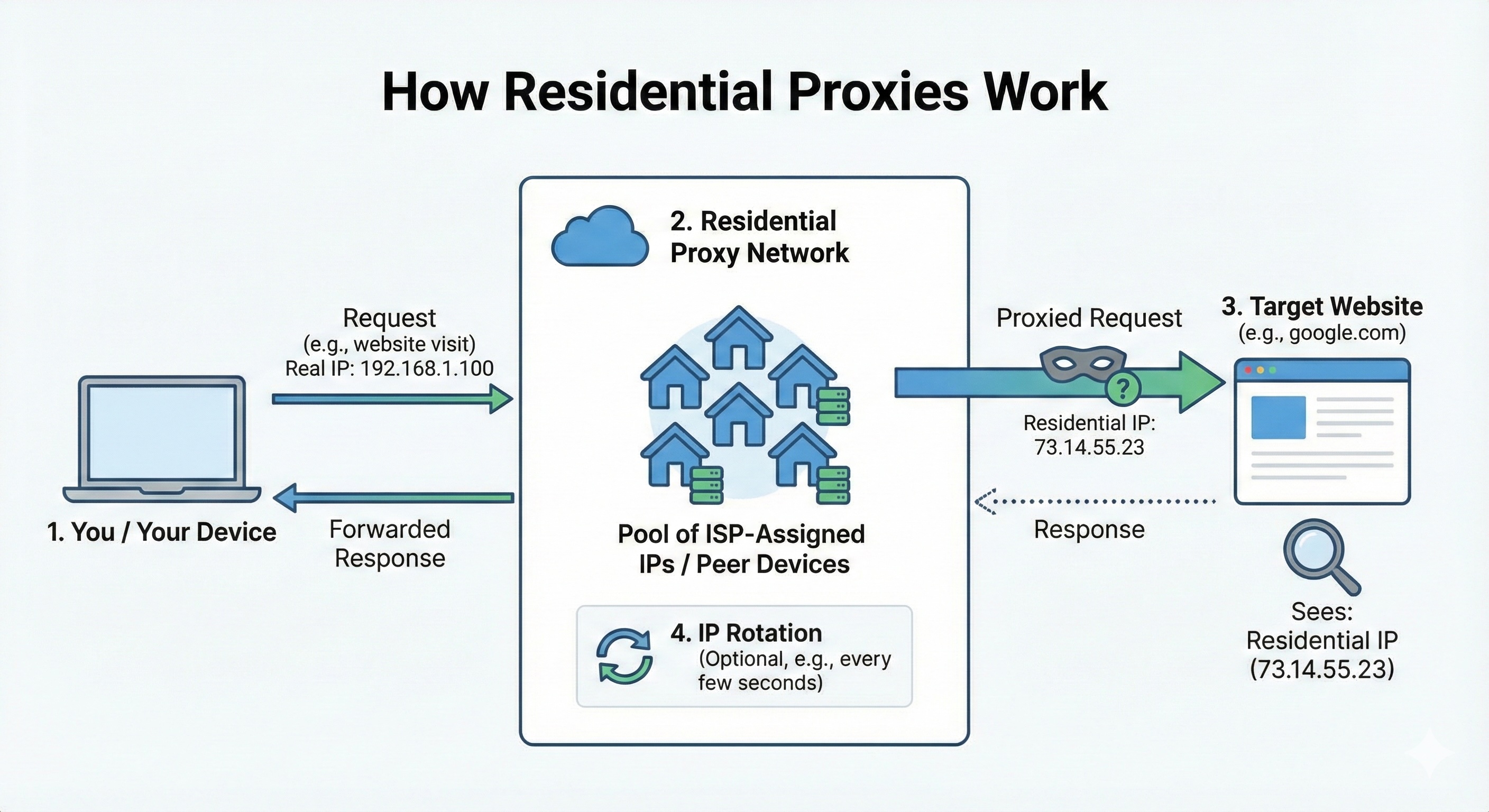
2. How Residential Proxies Work (Technical Deep Dive + Diagram)
Here’s the exact flow in 2026:- Your Device Sends a Request → You connect to a single backconnect gateway (e.g., gate.provider.com
 ort).
ort). - Provider’s Infrastructure Selects an IP → From a massive pool (100M–400M+ residential IPs). You can specify country, city, ZIP, ASN (specific ISP), or carrier.
- Traffic Routes Through Real Device → The request is forwarded through a consenting residential connection (P2P SDK in apps, browser extensions, or direct ISP partnerships).
- Target Website Sees Only the Residential IP → Appears as a normal user.
- Response Returns → Back through the gateway to you.
- Rotation Happens Automatically → Per request, timed interval, or sticky session (your choice via dashboard/API parameters).
Ethical Sourcing in 2026: Top providers now emphasize consent-based P2P networks — users opt in via free apps/games and earn rewards. No shady malware or forced sharing. This reduces legal risks and improves pool quality.
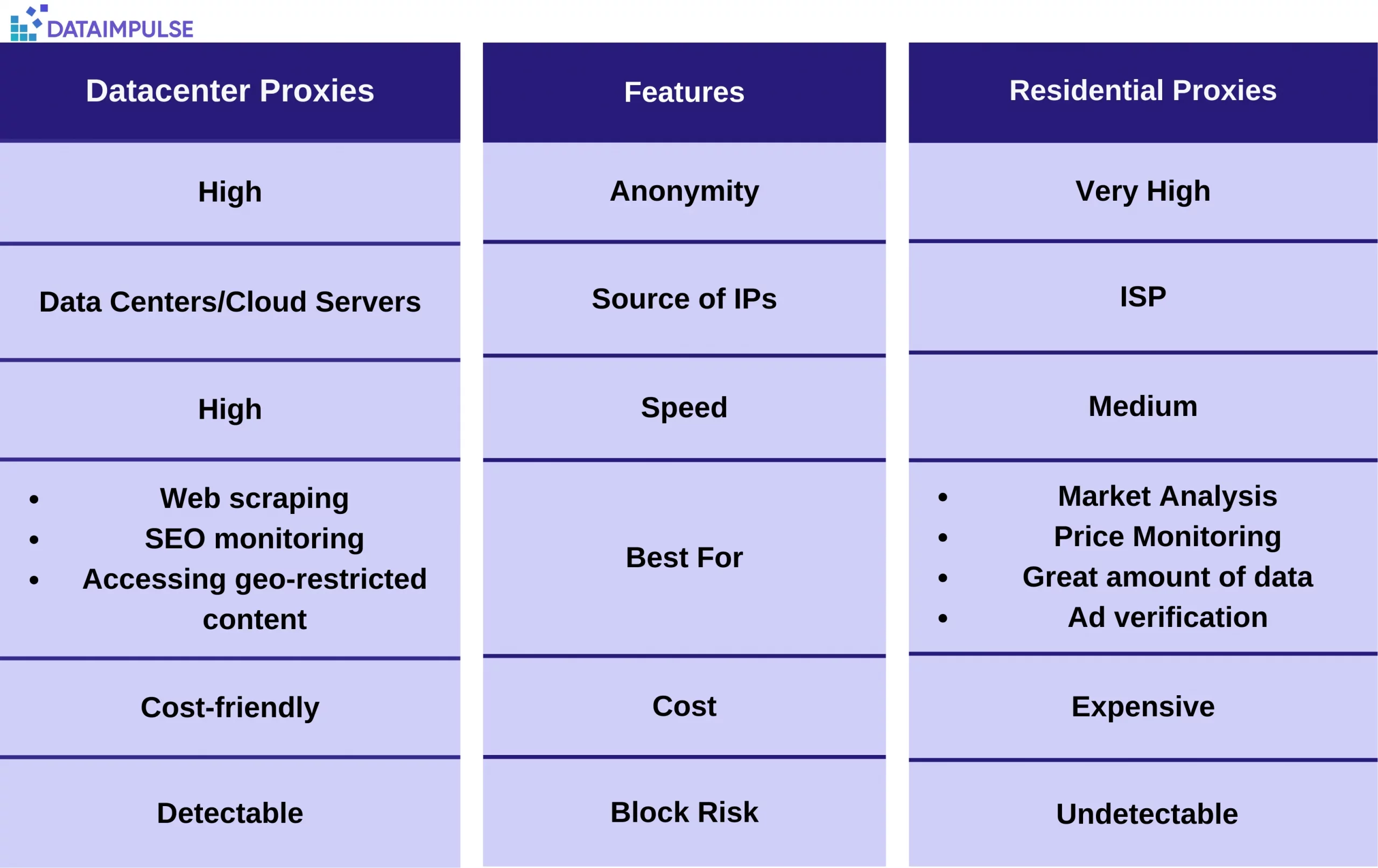
Datacenter Proxies vs Residential Proxies
Rotation & Session Control:
- Per-Request: New IP every single request (max anonymity).
- Timed: Change every 1–30 minutes.
- Sticky: Same IP for entire session or up to 24+ hours (perfect for logins/carts).
3. Types of Residential Proxies (2026 Classification)
Modern residential proxies come in four main flavors:- Rotating Residential Proxies → IPs change automatically. Ideal for scraping and high-volume tasks.
- Static (Dedicated) Residential Proxies → One fixed residential IP for long sessions (account management, marketplaces).
- ISP (Hybrid) Residential Proxies → Datacenter hardware but with real ISP-assigned residential IP ranges → faster speeds + residential trust.
- Shared vs. Private → Shared: Multiple users on same pool (cheaper). Private: Exclusive access (more stable, higher cost).
What Is a Residential Proxy? Types, Use Cases and How it works?
4. Residential vs. Datacenter vs. Mobile Proxies (2026 Comparison Table)
| Feature | Residential Proxies | Datacenter Proxies | Mobile Proxies |
|---|---|---|---|
| IP Source | Real home ISP connections | Cloud/server farms | Real 3G/4G/5G devices |
| Anonymity/Trust | Very High | Low | Highest |
| Speed | Medium (200–800 ms) | Very High (50–200 ms) | Low (300–1500 ms) |
| Typical Pool Size | 100M–400M+ | 40K–100K+ | 5M–15M+ |
| Cost (per GB) | $1–$8 (bulk as low as $0.8) | $0.50–$3 | $10–$30 |
| Success Rate on Strict Sites | 95–99% | 40–70% | 98%+ |
| Best For | Scraping, social, e-com, ad verification | High-speed bulk tasks | Apps, TikTok/Instagram |
| Detection Risk | Very Low | High | Lowest |
Datacenter vs. Residential Proxies
5. Pros & Cons (Realistic 2026 View)
Pros:- Near-undetectable (real ISP ASNs + user-like behavior).
- Precise geo-targeting (city/ZIP/ASN in top providers).
- High success rates even against AI anti-bots.
- Full rotation + sticky session flexibility.
- Ethical options now standard.
Cons:
- More expensive than datacenter.
- Speed varies with real-user bandwidth.
- Higher cost for very high concurrency.
- Requires responsible use to avoid ethical/legal issues.
6. Top Residential Proxy Providers in 2026 (Tested & Ranked)
Based on 2026 independent reviews, pool quality, success rates, targeting, and value:| Rank | Provider | Pool Size | Starting Price (per GB) | Best For | Standout Feature |
|---|---|---|---|---|---|
| 1 | Decodo (ex-Smartproxy) | ~115M+ | $2–$3.75 | Value + performance | Best balance, high success rates |
| 2 | Oxylabs | 175M+ | $4–$8 | Enterprise scale | Premium features & support |
| 3 | Bright Data | 150M–400M+ | $5–$8 | Advanced targeting | Largest pool + AI tools |
| 4 | IPRoyal | ~34M | $1.75–$3 | Budget & non-expiring traffic | Affordable + ethical |
| 5 | SOAX | 155M+ | $3.40–$3.60 | Ethical sourcing | Consent-based + flexible filtering |
| 6 | DataImpulse | ~90M+ | $1 | Pure budget scraping | Non-expiring traffic |
| 7 | NetNut | Large | ~$3–$5 | High-volume | Stable sticky sessions |
Pricing Trends 2026: Pay-as-you-go is standard. Bulk (1TB+) drops to $0.8–$2.50/GB. Many offer trials or money-back guarantees.
7. Real-World Use Cases (With Success Tips)
- Web Scraping & Price Monitoring: Rotating residential + city targeting.
- Social Media & Multi-Account Management: Sticky sessions + private pools.
- Ad Verification & Brand Protection: Geo-specific residential IPs.
- E-commerce & Sneaker Copping: Mobile-blended residential.
- SEO/SERP Tracking & Market Research: ASN/ZIP-level accuracy.
- AI Agents & Automation: Session persistence for complex tasks.
8. How to Get Started – Step-by-Step Setup (2026)
- Choose provider → Start with Decodo or IPRoyal trial.
- Sign up → Get gateway credentials (usernameassword or IP whitelist).
- Configure:
- Browser Extension: Simple for manual testing.
- Python Code Example(requests library):
Python:import requests proxies = { "http": "http://user:pass@gateway.provider.com:port", "https": "http://user:pass@gateway.provider.com:port" } # Add session parameters if needed response = requests.get("https://example.com", proxies=proxies, timeout=15) print(response.text)
- Test IP → Visit whatismyipaddress.com.
- Add rotation rules in dashboard (sticky/per-request + geo filters).
- Scale → Monitor success rate & rotate user-agents/fingerprints.
9. Expert Best Practices & Advanced Tips (2026)
- Match proxy type to target (residential for anti-bot sites).
- Use sticky sessions for logins; per-request for data pulls.
- Combine with fingerprint spoofing, random delays, and CAPTCHA solvers.
- Monitor usage dashboards daily.
- Choose consent-based providers to stay ethical.
- Start small → Test 10–50 requests before scaling.
- Budgeting tip: Calculate GB usage (one page load ≈ 100–500 KB).
Troubleshooting Common Issues:
- High blocks → Switch to sticky + slower rotation.
- Slow speeds → Try ISP hybrids or check geo-targeting.
- Cost spikes → Optimize concurrency and caching.
10. Ethics, Legality & Future Trends (2026 Outlook)
- Always respect robots.txt, terms of service, and local laws.
- Ethical sourcing is now a competitive advantage.
- 2026 Trends: AI-powered smart routing, deeper ASN/ZIP targeting, integration with agentic AI browsers, and even tighter regulatory scrutiny on proxy pools.
Quick Glossary:
- Backconnect → Single gateway for automatic rotation.
- ASN Targeting → Route through specific ISP network.
- Sticky Session → IP persists for a task.
Residential proxies deliver unmatched stealth and reliability in 2026. Start with a reputable provider’s trial, test thoroughly, and scale responsibly. You’ll see dramatically higher success rates and fewer headaches.
Have a specific use case (e.g., Amazon scraping setup, Instagram automation, or Python/Selenium integration)? Ask for tailored code, dashboard screenshots, or provider discount links! This guide is your one-stop resource — bookmark it and revisit as your projects grow.


