

Carding Forum
Professional
- Messages
- 2,788
- Reaction score
- 1,363
- Points
- 113
Review of the universal card from the British company Curve.
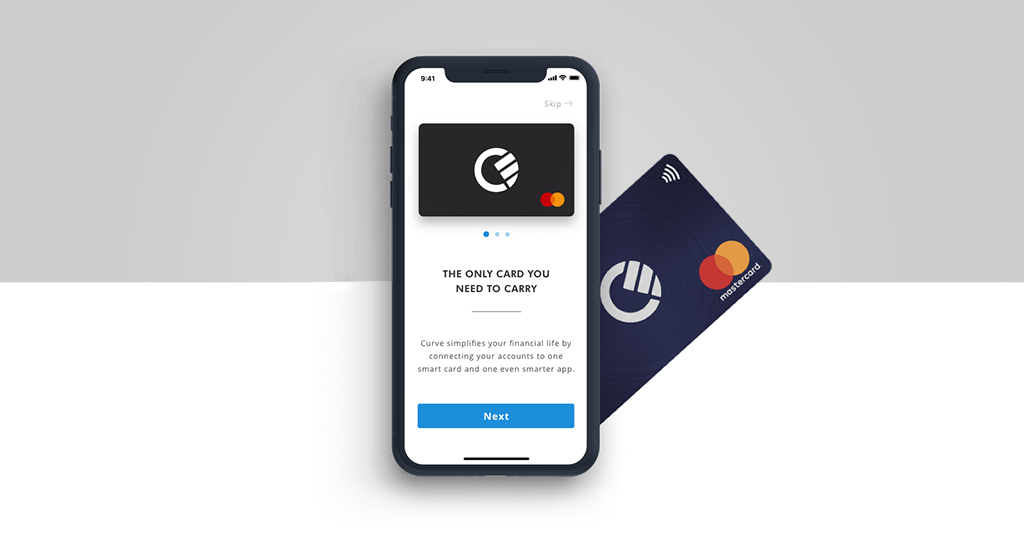
How to add a bank card to the Curve multi-wallet.
Earlier, the editorial staff of PaySpace Magazine talked about the three most popular multicard wallets, which replace many credit, debit, gift, membership, ID cards with one multifunctional "plastic". Today we publish a review of one of such universal cards - the British product Curve.
Curve multicard: what it is and how to use it
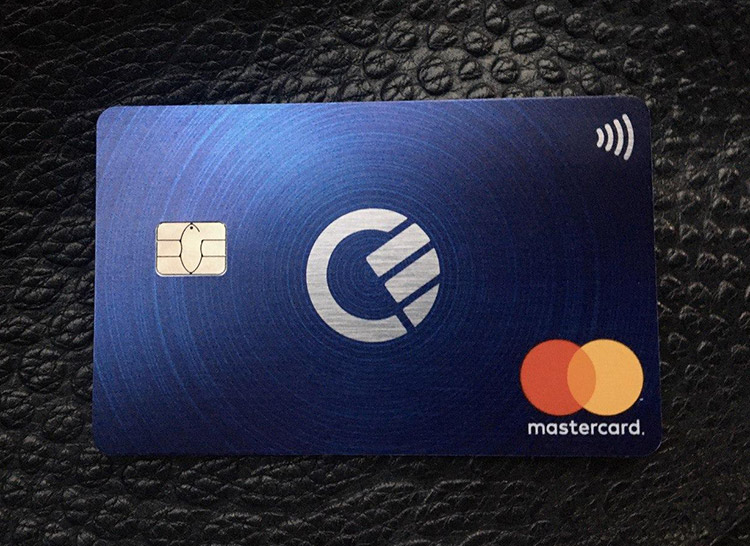
What the Curve card looks like.
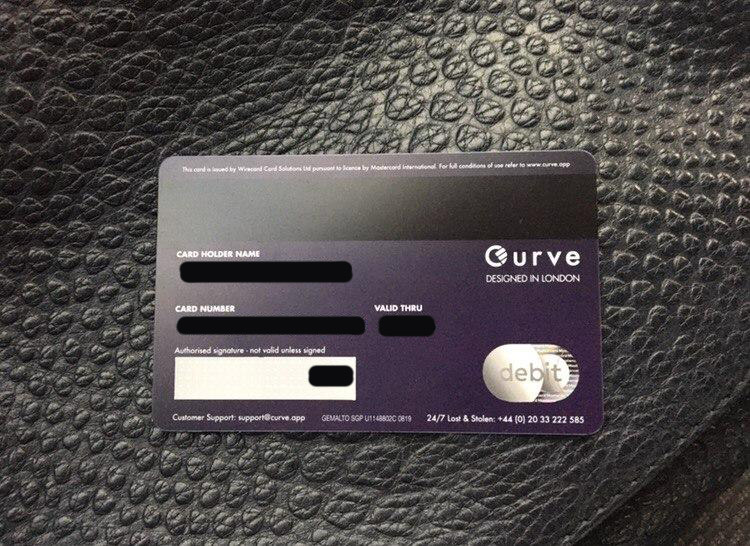
All card details and the owner's name are indicated on the back of the "plastic".
Curve is a British fintech startup that allows its users to store up to 100 payment cards on one "plastic" Mastercard and manage them through a mobile application. When ordering, the user receives a personalized Mastercard debit card. There are several card products to choose from:
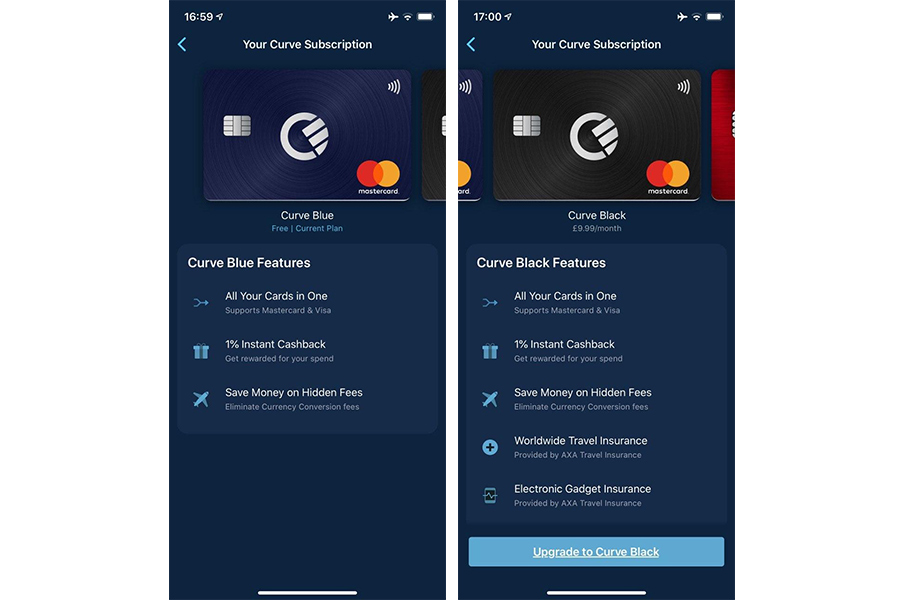
Curve Blue standard card and Curve Black premium
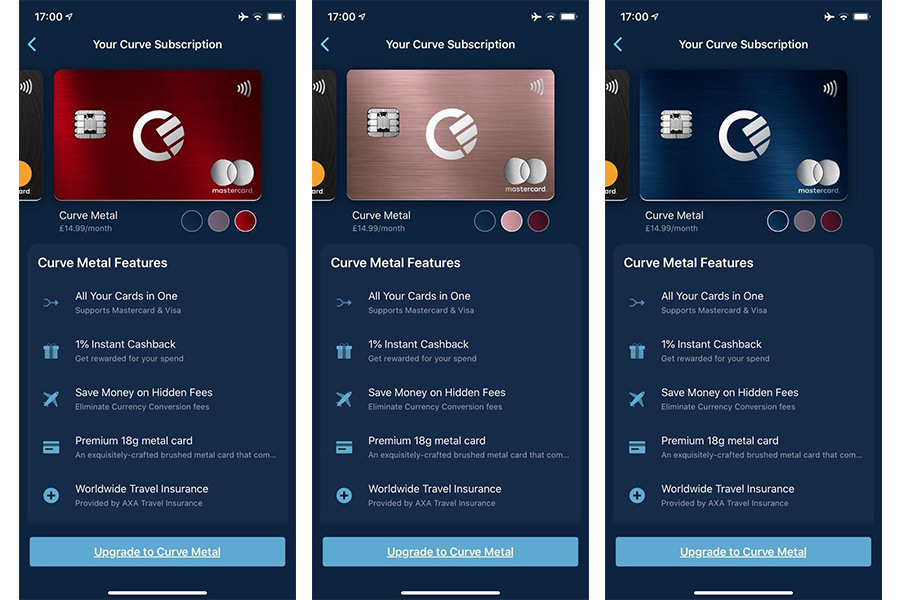
Premium Curve Metal card in three colors
In addition to the ability to add about a hundred payment cards, Curve also provides its users with the following functions:
The advantage of physical "plastic": if the payment terminal does not support NFC for contactless payment using mobile devices (or you simply need to withdraw cash from an ATM), you can always use Curve.
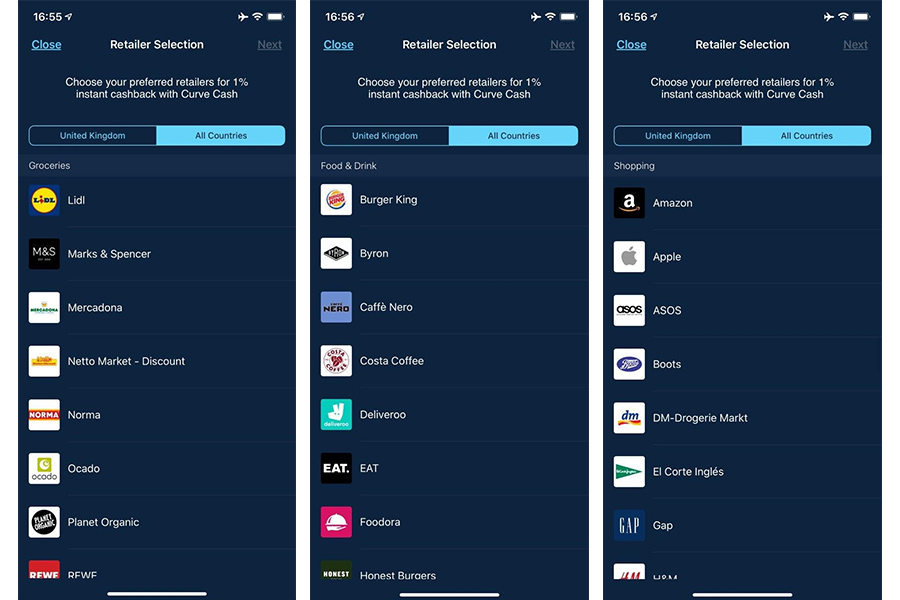
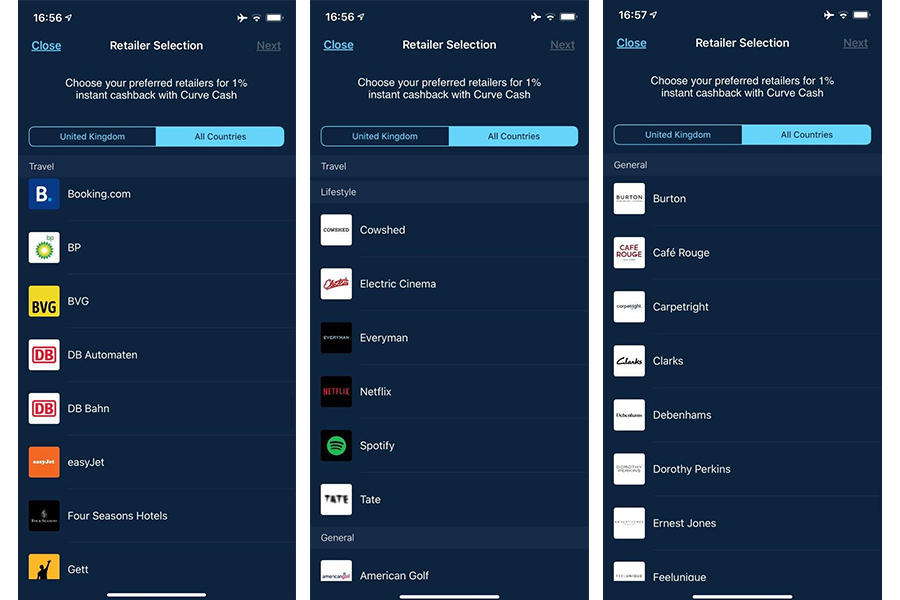
Examples of brands for products and services of which Curve users can receive cashback
How Curve works
To store a dozen cards on one "plastic", you need to install the Curve application, register in it, and then add your debit and credit cards. Then - confirm the card in one of the following ways:
What cards can be added
You can add Visa or Mastercard credit and debit cards to the Curve app. The service also supports prepaid cards: Al-Mawarid Bank SAL, B Next, Boon, Capital on Tap, Cashplus, Commerzbank, DiPocket, Fidor Bank, Holvi, Lydia, Metabank, Monese, PayPal, Paysera, Pleo, Pockit, Postepay, Postpaye Evolution , Revolut, Santander, Self Bank, Skrill / Paysafe, Soldo, Spendesk / Transact, Starling, Shine, Tide, Twisto and Wirex.
American Express, Maestro, Diners Club, JCB and UnionPay cards cannot be added.
How to get Curve
According to the information on the official website of the company, the Curve card is currently available to residents of 31 countries of the European Economic Area. Earlier it was reported that in 2020 the startup plans to enter the US market.
To order a multicard, you need to download the Curve mobile application from the App Store or Google Play Store. After installation, you need to go through a simple registration and then receive an email with an order confirmation. Next, you need to link at least one debit or credit Mastercard or Visa card to your Curve account in the application, after which the company will send a physical multicard. On average, delivery in the UK takes up to 5 days, in the EU countries - from 1 to 2 weeks. Upon receipt, the customer will be presented with a personalized Curve card.
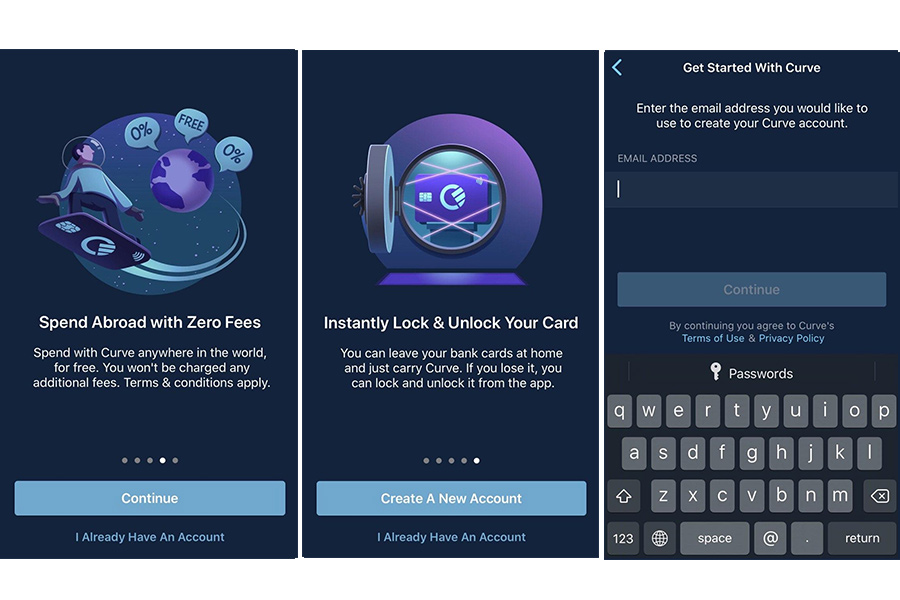
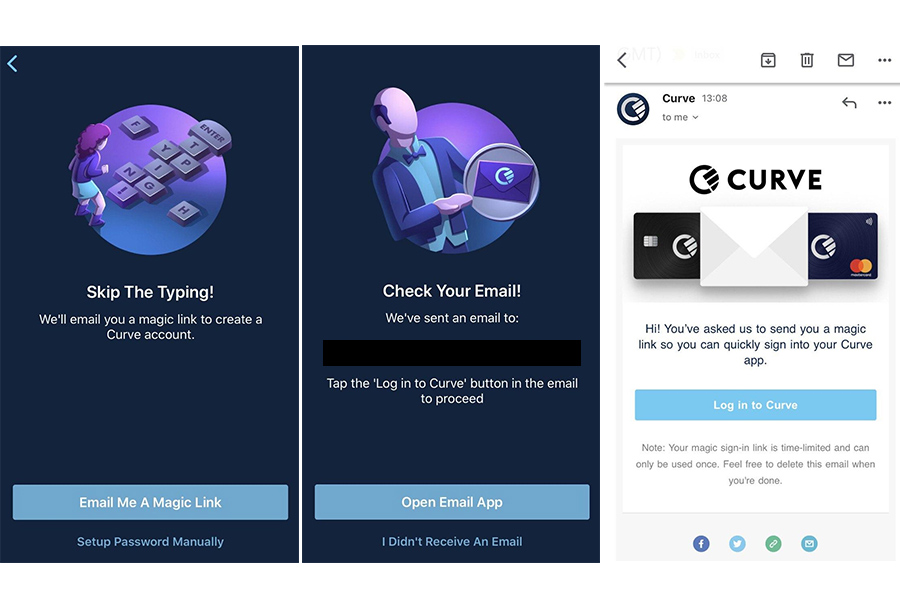
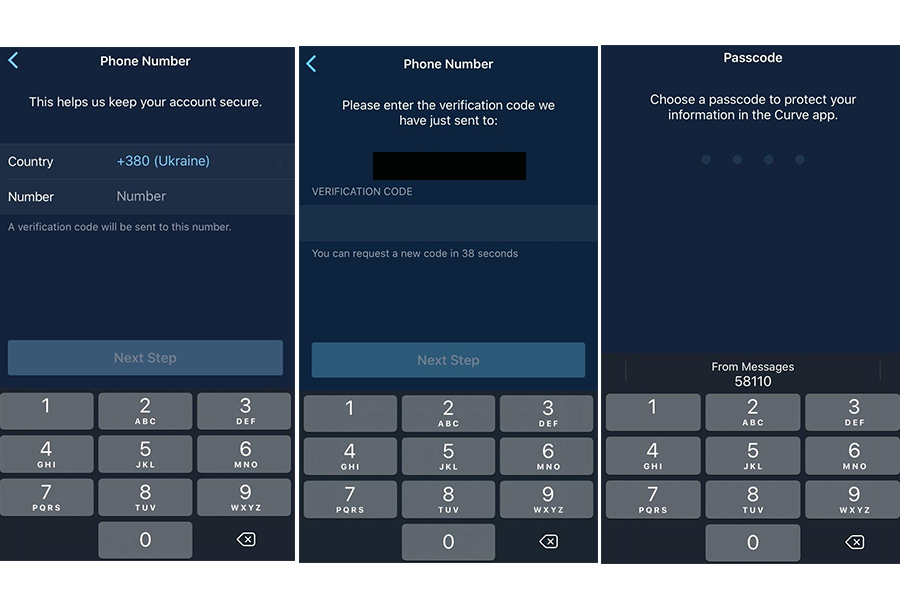
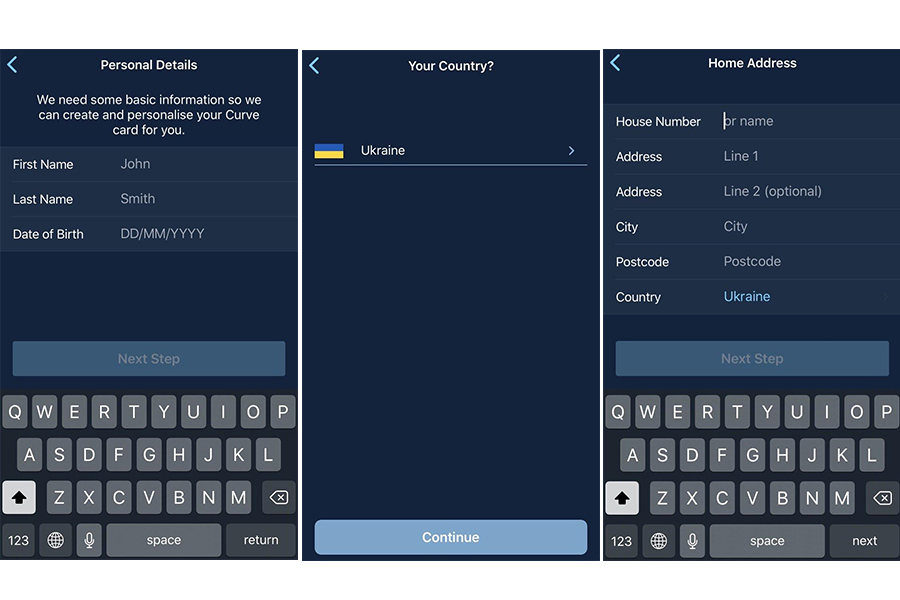
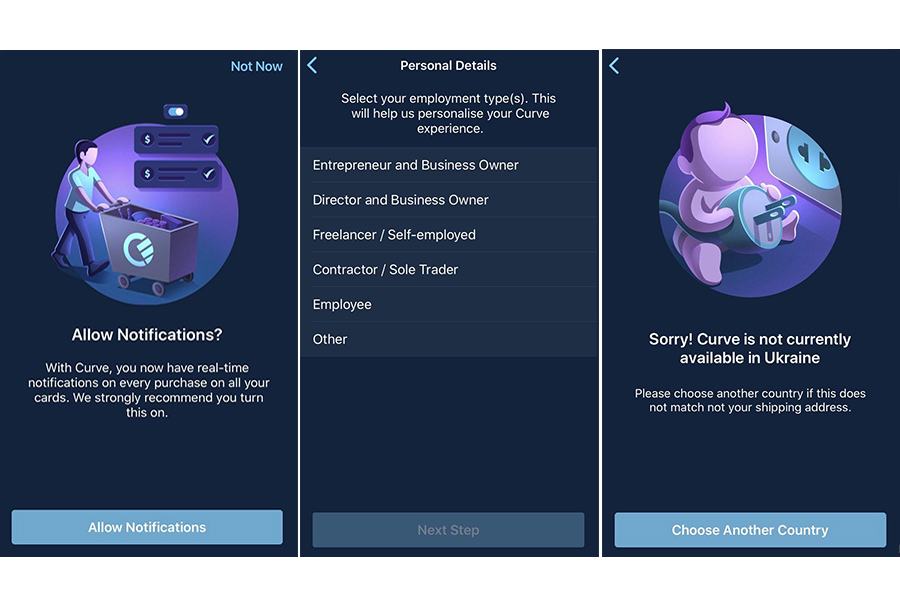
Note. Registration in the application is not available for Ukrainians. When choosing Ukraine, the application will offer to choose another country to continue registration, however, if you have already indicated Ukraine, then you will not be able to change the settings - you will not be able to go back and specify a different place of residence. However, you can add a card from a Ukrainian issuing bank to the application.
How to add a Ukrainian bank card to Curve
You can add Visa and Mastercard cards of Ukrainian banks to the Curve application. Adding a card is the same as in any other banking mobile applications: you can take a photo of the card or enter data manually (the cardholder's name, card details and the actual address of the cardholder). After loading the card, it will need to be confirmed by conducting a microtransaction (see above) and then selected as the main card.
Below is a step-by-step process for adding a card to the Curve app:

Take a photo of the card or enter card details manually
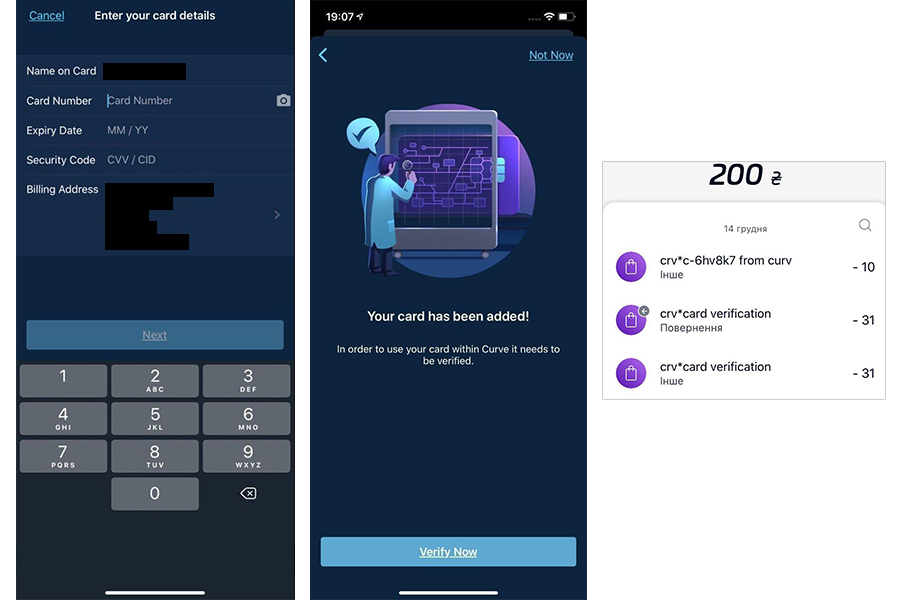
Enter the payer's address and confirm the microtransaction
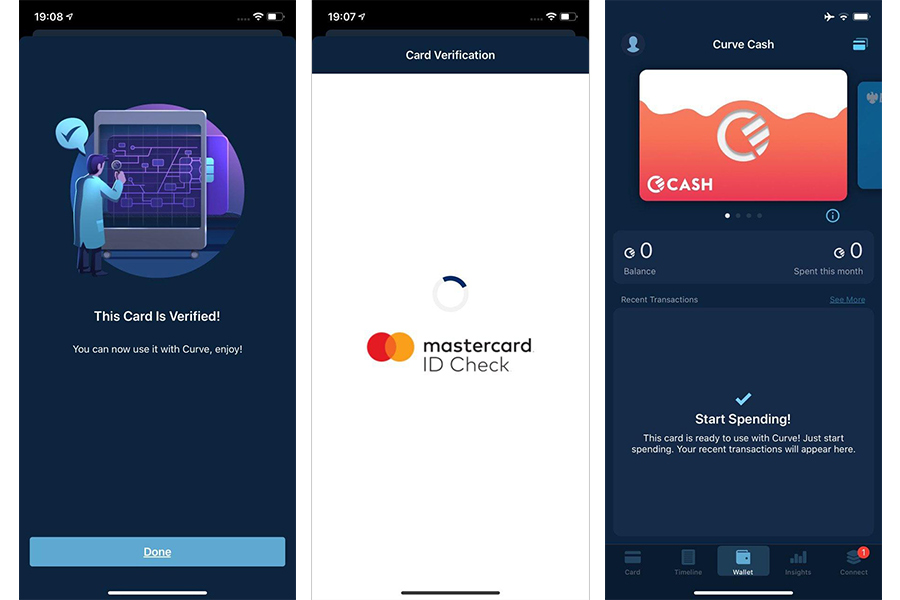
After verification, the card will be added to the application
When adding a hryvnia card, a message will appear that this currency is not supported by the application, as a result of which the payment will be converted into pounds sterling, which may result in an additional commission (for example, UAH 10 was withdrawn from the account for verification of the card due to the conversion) ... However, if you add a currency card of a Ukrainian issuer in dollars or euros, the additional% will not be charged, since these are currencies supported by the application.
Curve currently supports 27 currencies, including the Hong Kong dollar, the Russian ruble and the South African rand. A complete list of supported currencies can be found below.
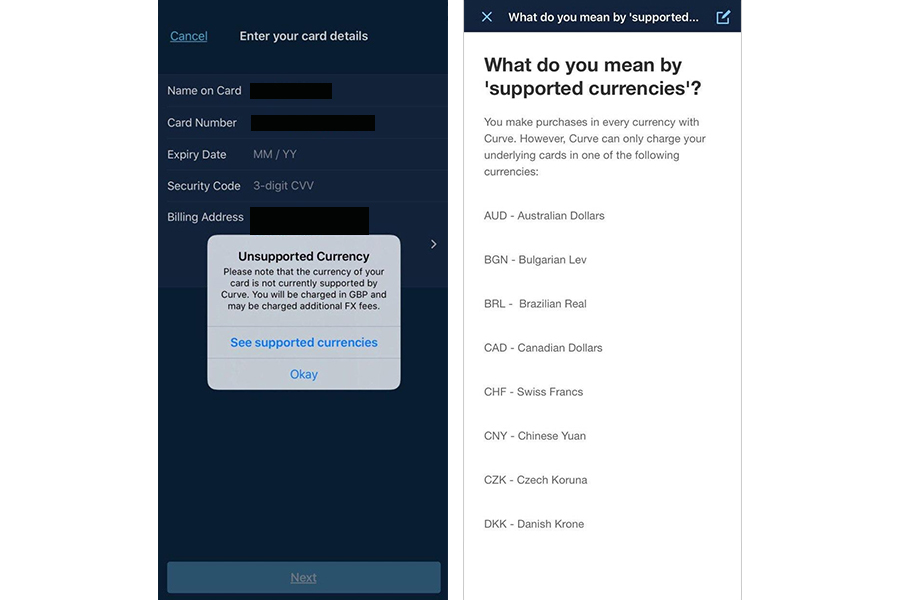
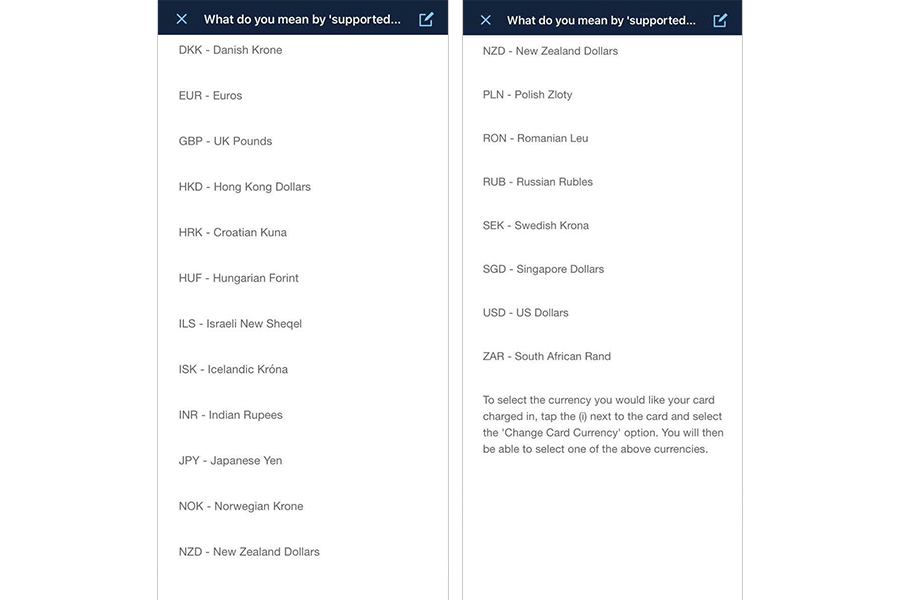
List of supported currencies Curve
Is there a commission
When paying with a hryvnia card using Curve, a small commission may be charged, as the hryvnia will be converted into pounds sterling during the transaction. Thus, payment for goods and services in Ukraine and abroad (everywhere, except for Great Britain) will occur with%. When paying with a hryvnia card, no commission will be charged for goods and services in pounds. Payment with a Ukrainian bank card, the account of which is issued in one of the currencies supported by Curve, will also take place without commission.
Below is an example of buying a bottle of Coca-Cola (0.5 ml) in the UK and Ukraine. The cost of a drink in Britain is £ 1.45, in Ukraine - 11.89 UAH. Payment for the purchase with a Curve card in Britain went without commission - exactly 45.21 UAH was debited from the Ukrainian card, which was equal to 1.45 pounds sterling at the then exchange rate.
In Ukraine, when paying for goods using Curve, UAH 12.06 was withdrawn from a Ukrainian bank card instead of UAH 11.89 indicated in the check due to the conversion of hryvnia into pounds.
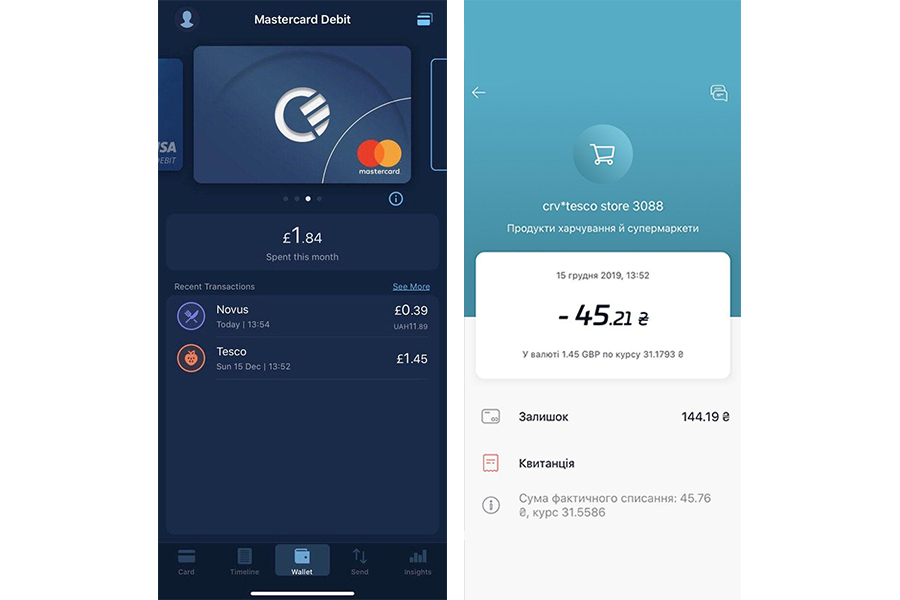
Payment by hryvnia card through Curve for goods in pounds sterling is free of charge
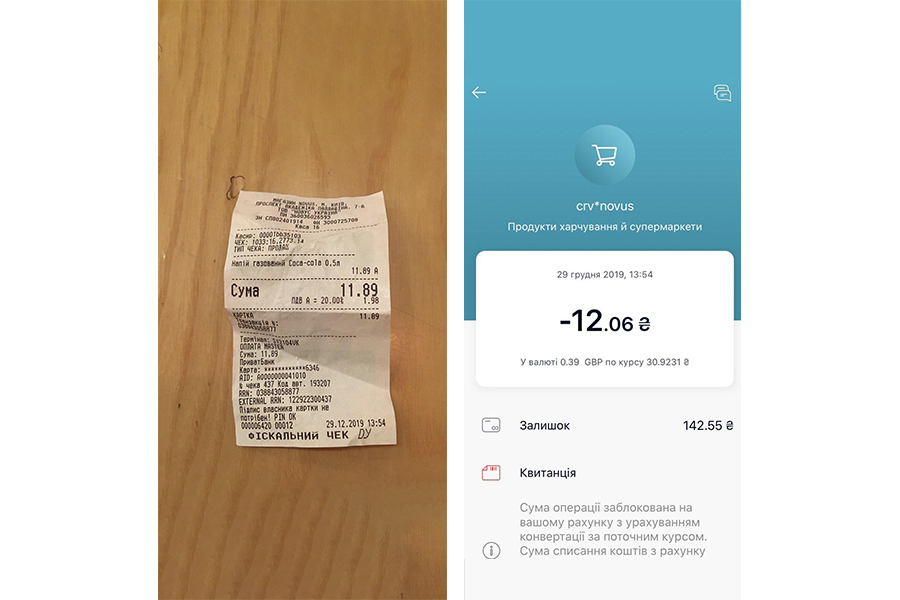
When paying with a hryvnia card through Curve, % will be removed for goods in hryvnia due to conversion into pounds
Note. You can add cards of Ukrainian banks to the Curve multicard, further using the numerous advantages of the product. However, since Curve cannot be ordered in Ukraine, it will be useful to those Ukrainians who study or work abroad. In addition, during its registration, you may be asked to confirm that you really live in the country in which you want to order the card (for example, by sending a photo of your license or passport) - otherwise the card may not be sent to you.
In November 2019, Curve announced the integration with the Google Pay mobile wallet. This will allow the company's customers to link all credit cards from a digital wallet to a traditional card, and then pay with it at POS-terminals. The company implemented the same functionality in early 2020 with Apple Pay. However, neither these announcements, nor the large investments that the company managed to attract earlier in the summer, did not increase the popularity of the product among ordinary citizens - out of 500 thousand customers of the company, only 14% actively use its services.
Photo: psm7.com
How to add a bank card to the Curve multi-wallet.
Earlier, the editorial staff of PaySpace Magazine talked about the three most popular multicard wallets, which replace many credit, debit, gift, membership, ID cards with one multifunctional "plastic". Today we publish a review of one of such universal cards - the British product Curve.
Curve multicard: what it is and how to use it
What the Curve card looks like.
All card details and the owner's name are indicated on the back of the "plastic".
Curve is a British fintech startup that allows its users to store up to 100 payment cards on one "plastic" Mastercard and manage them through a mobile application. When ordering, the user receives a personalized Mastercard debit card. There are several card products to choose from:
- Curve Blue is a free blue card
- Curve Black - card in black, costing 9.99 € / month
- Curve Metal - Red, Blue, and Rose Gold card, priced at £ 14.99 / month (roughly $ 14.99)
Curve Blue standard card and Curve Black premium
Premium Curve Metal card in three colors
In addition to the ability to add about a hundred payment cards, Curve also provides its users with the following functions:
- Transfer funds in more than 25 different currencies
- 1% cashback on goods and services of three merchants. For Curve Blue - 90 days, for Curve Black and Curve Metal - unlimited. The seller list includes dozens of well-known brands, including Starbucks, Virgin Experience, Netflix, Spotify, Booking.com, Apple, Amazon, H&M, and more.
- Go Back in Time. Allows you to change the card used for a transaction of up to 1,000 euros within 14 days after payment
- The ability to spend money abroad without additional conversion fees. Free account has limits on overseas transactions with zero fees up to £ 500 (about $ 652) per month
- Free cash withdrawal from ATMs abroad. The service operates according to the limit of the tariff plan, but up to 600 pounds (about $ 782) per month
- Curve customer protection. Refunds up to 100 thousand euros for unauthorized transactions or for services and goods that were not provided by the seller or were provided of inadequate quality
- Free travel insurance and insurance for electronic gadgets. The service is only available to Curve Black and Curve Metal cardholders in the UK, France, Germany, Ireland, Italy, Spain and Portugal.
- Locking and unlocking the card in the application. If you lose your card, you can freeze it in the app and unlock it later when it is found
The advantage of physical "plastic": if the payment terminal does not support NFC for contactless payment using mobile devices (or you simply need to withdraw cash from an ATM), you can always use Curve.
Examples of brands for products and services of which Curve users can receive cashback
How Curve works
To store a dozen cards on one "plastic", you need to install the Curve application, register in it, and then add your debit and credit cards. Then - confirm the card in one of the following ways:
- 3DSecure - the card issuing bank must confirm the microtransaction with a small amount debited by the user entering a password or SMS confirmation. Later, the funds will be returned to the user
- Microcharge - Curve will charge a small amount from the user's card. After that, you will need to check the bank statement and enter the code that will appear in the Curve application (the code may appear within a few days). After entering the code, the money will be immediately returned to the card
What cards can be added
You can add Visa or Mastercard credit and debit cards to the Curve app. The service also supports prepaid cards: Al-Mawarid Bank SAL, B Next, Boon, Capital on Tap, Cashplus, Commerzbank, DiPocket, Fidor Bank, Holvi, Lydia, Metabank, Monese, PayPal, Paysera, Pleo, Pockit, Postepay, Postpaye Evolution , Revolut, Santander, Self Bank, Skrill / Paysafe, Soldo, Spendesk / Transact, Starling, Shine, Tide, Twisto and Wirex.
American Express, Maestro, Diners Club, JCB and UnionPay cards cannot be added.
How to get Curve
According to the information on the official website of the company, the Curve card is currently available to residents of 31 countries of the European Economic Area. Earlier it was reported that in 2020 the startup plans to enter the US market.
To order a multicard, you need to download the Curve mobile application from the App Store or Google Play Store. After installation, you need to go through a simple registration and then receive an email with an order confirmation. Next, you need to link at least one debit or credit Mastercard or Visa card to your Curve account in the application, after which the company will send a physical multicard. On average, delivery in the UK takes up to 5 days, in the EU countries - from 1 to 2 weeks. Upon receipt, the customer will be presented with a personalized Curve card.
Note. Registration in the application is not available for Ukrainians. When choosing Ukraine, the application will offer to choose another country to continue registration, however, if you have already indicated Ukraine, then you will not be able to change the settings - you will not be able to go back and specify a different place of residence. However, you can add a card from a Ukrainian issuing bank to the application.
How to add a Ukrainian bank card to Curve
You can add Visa and Mastercard cards of Ukrainian banks to the Curve application. Adding a card is the same as in any other banking mobile applications: you can take a photo of the card or enter data manually (the cardholder's name, card details and the actual address of the cardholder). After loading the card, it will need to be confirmed by conducting a microtransaction (see above) and then selected as the main card.
Below is a step-by-step process for adding a card to the Curve app:
- select the "Add a New Card" option, then take a photo of the card to add its data
- then we indicate the address of the payer and confirm the debiting of funds, which will then be returned to the card
- after verification, the card will be added to the application
Take a photo of the card or enter card details manually
Enter the payer's address and confirm the microtransaction
After verification, the card will be added to the application
When adding a hryvnia card, a message will appear that this currency is not supported by the application, as a result of which the payment will be converted into pounds sterling, which may result in an additional commission (for example, UAH 10 was withdrawn from the account for verification of the card due to the conversion) ... However, if you add a currency card of a Ukrainian issuer in dollars or euros, the additional% will not be charged, since these are currencies supported by the application.
Curve currently supports 27 currencies, including the Hong Kong dollar, the Russian ruble and the South African rand. A complete list of supported currencies can be found below.
List of supported currencies Curve
Is there a commission
When paying with a hryvnia card using Curve, a small commission may be charged, as the hryvnia will be converted into pounds sterling during the transaction. Thus, payment for goods and services in Ukraine and abroad (everywhere, except for Great Britain) will occur with%. When paying with a hryvnia card, no commission will be charged for goods and services in pounds. Payment with a Ukrainian bank card, the account of which is issued in one of the currencies supported by Curve, will also take place without commission.
Below is an example of buying a bottle of Coca-Cola (0.5 ml) in the UK and Ukraine. The cost of a drink in Britain is £ 1.45, in Ukraine - 11.89 UAH. Payment for the purchase with a Curve card in Britain went without commission - exactly 45.21 UAH was debited from the Ukrainian card, which was equal to 1.45 pounds sterling at the then exchange rate.
In Ukraine, when paying for goods using Curve, UAH 12.06 was withdrawn from a Ukrainian bank card instead of UAH 11.89 indicated in the check due to the conversion of hryvnia into pounds.
Payment by hryvnia card through Curve for goods in pounds sterling is free of charge
When paying with a hryvnia card through Curve, % will be removed for goods in hryvnia due to conversion into pounds
Note. You can add cards of Ukrainian banks to the Curve multicard, further using the numerous advantages of the product. However, since Curve cannot be ordered in Ukraine, it will be useful to those Ukrainians who study or work abroad. In addition, during its registration, you may be asked to confirm that you really live in the country in which you want to order the card (for example, by sending a photo of your license or passport) - otherwise the card may not be sent to you.
In November 2019, Curve announced the integration with the Google Pay mobile wallet. This will allow the company's customers to link all credit cards from a digital wallet to a traditional card, and then pay with it at POS-terminals. The company implemented the same functionality in early 2020 with Apple Pay. However, neither these announcements, nor the large investments that the company managed to attract earlier in the summer, did not increase the popularity of the product among ordinary citizens - out of 500 thousand customers of the company, only 14% actively use its services.
Photo: psm7.com


