

Detektor
Member
- Messages
- 9
- Reaction score
- 2
- Points
- 3
Good day!
In this article, I'd like to discuss the components of a successful GADS launch using carding. I'll also give a brief review of the material (in my opinion), life hacks for choosing quality materials, and explain the approximate cost of a launch, as well as how a beginner can avoid overpaying and wasting money on unnecessary consumables.
What makes a successful launch?
First, you need to decide on your GADS work style. As I wrote in the previous article, the best start for a beginner is post-paid, which is what we'll discuss today. If you like this article, I'll write a separate one on pre-paid.
Components:
Now, let's take things one step at a time
Proxies
I won't go into detail about proxies; carder.es has plenty of articles on the different types of proxies and their importance in our business. I'll keep it short: clean, no blacklists. Personally, I use Proxyma, and the proxy data is more than enough for me. The main thing to understand is that we don't need hyper-precise proxies specific to the cardholder's street address; just country-specific ones are sufficient, so we can use any service designed for traffic arbitrage.
Email
Let's dwell on this a bit longer. First, you need to understand that there are several types of mail on the market: autoregistered, self-registered, old-registered, and manually farmed.
Let's touch on manual farming right away. There's no argument here; it's the best starting point, especially when it comes to accounts from BananaADS or Midas. They're usually verified, so you can just go ahead and launch them. It's the best start for experienced users, but not for beginners, and here's why. Warmed-up email accounts cost between $10-$15, with a warm-up account starting from $30-$40. Knowing your setup simplifies things and speeds up setups, but when you're just starting out, the cost of a mistake is quite high compared to other options. I believe these accounts are designed for people who already have a setup and know how the network will behave.
Autoreg, Selfreg, and Oldreg are 100% your choice if you're new. Everyone develops their own tactics, and I'll share the ones I've developed from my own experience. First, we need to find an email seller. I use sites like prime-accs, retriv market, and darkmarket. There are tons of these sites selling various accounts, and I recommend using them all, as it's hard to know where you'll find legitimate emails. It's best to look for emails that are at least one month old, with little spam, no existing payment profiles, and not used in GADS. Another good indicator is that the backup email isn't a fake and comes with a password (for some reason, such emails often turn out to be reliable). It's best to choose accounts without 2FA or cookies (I think 2FA reduces trust on young accounts, as does logging in with cookies). They also don't have linked phone numbers, and preferably don't have linked additional devices. Ideally, use Octo, but this is rare. The main thing is to avoid buying too many accounts at once; try 1-3 at a time and see how they perform when linking and creating a new account. It's important to understand that farming and slacking only affect card binding, unwinding, and launch, as well as the trust level of the payment account. Therefore, it will take you longer to launch than with manual farming. However, such email addresses cost no more than $2. Since you're inexperienced, and SS is mostly invalid crap, you'll ruin more than one account and can save enough money for future launches. Once you get the hang of it, switch to manual farming and save time.
Disposable numbers
There's practically nothing to comment on here either.
They're requested in two cases:
1. When logging into your email or when creating an account. Here, we use a disposable number. I use smsactive, but you can choose any other service. You can use any geo (not necessarily a proxy or email geo). Sometimes numbers are invalid, in which case, close the tab until you reach the number verification screen and enter a new number.
2. Verification after launching the advertising account (in this case, if you work in the USA or Canada, you will be allowed to use numbers only from these geos +1) if the number is not valid, do the same as in the previous case, close the tab and go through verification again.
CC
First, you need to understand that you don't necessarily have to use VPA cards. There are various ways to link CCs without a microdeposit, and everyone chooses their own method. Regarding CC selection, I'll say this: if you buy from reputable shops, be prepared for statistics that 2-4 CCs will become 10 out of 10. Why is that? Poor validity and a terrible refund system? Perhaps, but the material is also overused. What do I mean? I mine my own material, primarily pushing it to a merchant to make money, and secondly, I run ads with it, and there's a noticeable difference between the cards I tried to add and the ones I didn't. This is the error.

This error can also occur for other reasons, such as when you trade a card multiple times in different account, or when it's empty. However, the card is still considered valid and therefore not eligible for a refund. However, most cards in public shops are affected by this error. Advice: "Take cards from the most recent database possible. If they don't have one, wait for a new one to be uploaded; that way you have a better chance of grabbing a decent card." I'll quickly run through the shops I bought from. Anti-shop is pure randomness: if everything is valid, you'll lose $1,000-$2,000, but if you take everything, it's invalid. Castro is expensive, and the refund system is crap, but you can find some valid cards and balances in newer databases (Teg-9, Cesar). WallmartCC - I haven't shopped there much, but the prices are good, and 3 out of 4 are valid and have a decent balance. Mercedes Parts Shop - I often buy from them if I don't have enough of my own parts. They have excellent, no-kill matte paint, 6-8 out of 10, depending on the update. I also recommend getting CC parts without a bill; they're usually cheaper, carders don't touch them, and they often leave us with good BINs. We don't need a bill when linking, so this is our ideal option. A normal price for a matte paint is $15, ideally $10.
Documents
are difficult here because all sellers usually sell to ten people. Because one document is needed for several accounts (3 to 8). Therefore, it often happens that you link a card, create an account, the payer verification comes in, you submit the documents, and then get banned because the documents don't match.
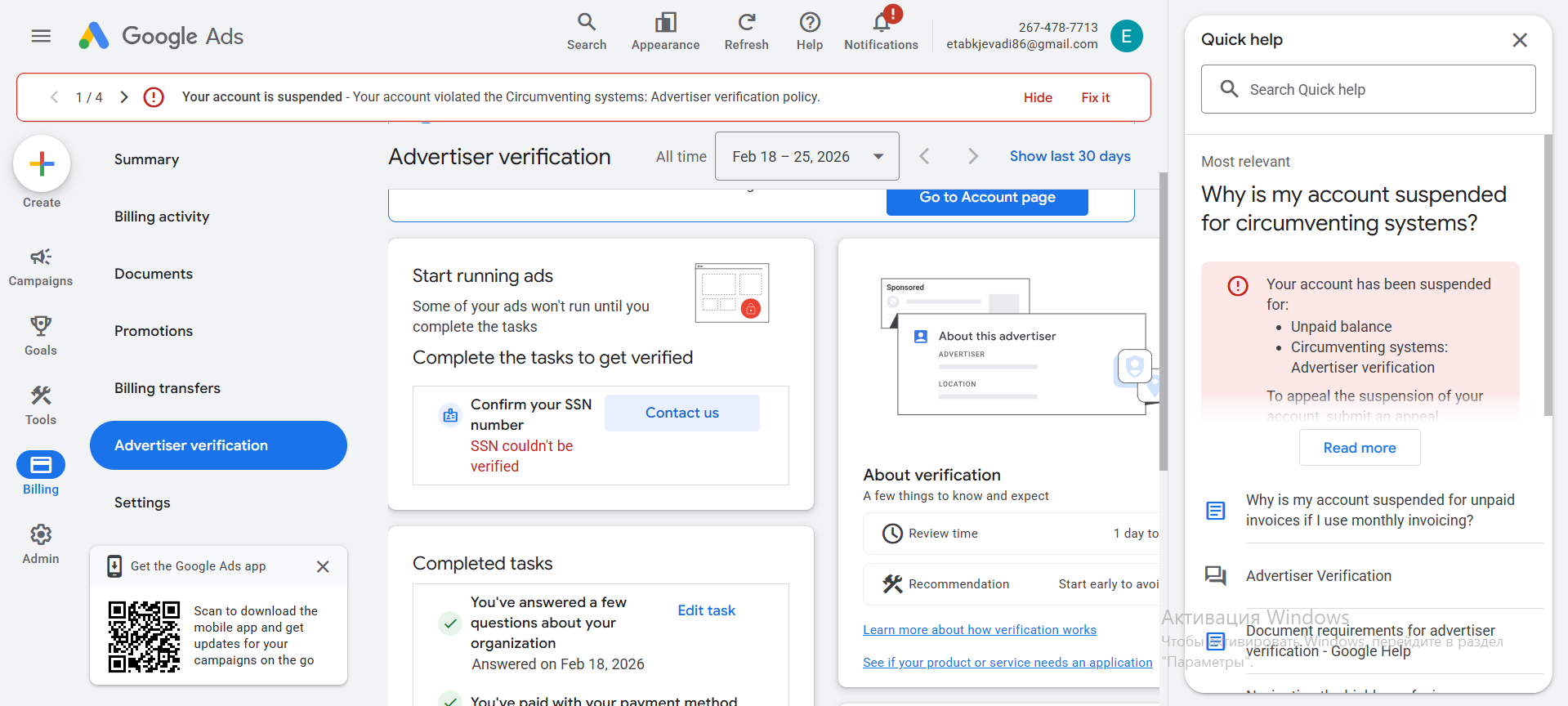
Here's an example for a US account (ignore the fact that this is SSN confirmation, as during this verification you enter your SSN incorrectly or correctly several times, and Google requests document verification. If the documents are valid, you'll get this). How can you avoid this and avoid wasting time and money on new proxy emails? It's pretty simple.
First, don't buy multiple documents from a seller, 1-3 at a time to start.
Second, don't buy fake documents; they're more expensive and more likely to fail, so buy only real ones for GADS.
Third, don't buy documents over $8 each; everything else is overpriced.
And here's a little lifehack from me: If you change your age below 18 at the post office and then return it, you'll be asked to verify your age through documents. If verification accepts your documents, GADS will accept them too.
Approximate Math
We'll be able to launch with a minimum purchase of about $25. This includes 1 GB of traffic on Proxyma for $5 (enough to launch 2-3 accounts), 1 email for $1, 1 CC for $10, 1 document, which is enough for several accounts, for $4, and a topped-up active SMS for $5. Of course, launching just one account doesn't make sense; you need to launch at least 10, but buying in bulk will be cheaper (proxies, documents, emails), but the risk of invalidity among them (numbers and CC) will be higher. When I purchased CC for launching 10 accounts, it cost about $300; the main expense was, of course, CC. When I started earning my own, it dropped to about $80-100.
Results
This niche isn't as expensive as it seems, if you don't chase premium consumables and dig into the mat. If you liked the article, give it a thumbs up. I hope you found this article interesting and that I was able to help you decide to take your first steps with GADS. Thank you for your attention, and all the best to everyone!
In this article, I'd like to discuss the components of a successful GADS launch using carding. I'll also give a brief review of the material (in my opinion), life hacks for choosing quality materials, and explain the approximate cost of a launch, as well as how a beginner can avoid overpaying and wasting money on unnecessary consumables.
What makes a successful launch?
First, you need to decide on your GADS work style. As I wrote in the previous article, the best start for a beginner is post-paid, which is what we'll discuss today. If you like this article, I'll write a separate one on pre-paid.
Components:
- Proxy
- Disposable number (not always, depends on the email)
- CC
- Documents
Now, let's take things one step at a time
Proxies
I won't go into detail about proxies; carder.es has plenty of articles on the different types of proxies and their importance in our business. I'll keep it short: clean, no blacklists. Personally, I use Proxyma, and the proxy data is more than enough for me. The main thing to understand is that we don't need hyper-precise proxies specific to the cardholder's street address; just country-specific ones are sufficient, so we can use any service designed for traffic arbitrage.
Let's dwell on this a bit longer. First, you need to understand that there are several types of mail on the market: autoregistered, self-registered, old-registered, and manually farmed.
- Autoregistrations registered with software usually cost pennies because they are sold half-empty, sometimes with a slight discount, but the risk of being banned is increased.
- Self-registered accounts, registered manually, are a little more expensive, but the risk of getting banned from email is lower.
- Old-timers can be either autoregisters or selfregisters, the difference is in the registration date. In my opinion, an old-timer is considered an account that is at least a year old (but for some, 3 months is already an old-timer).
- Manual farming, when your email has been warmed up for you, may already have an account created where a warm-up campaign (advertising campaign) was conducted, the most expensive type of email.
Let's touch on manual farming right away. There's no argument here; it's the best starting point, especially when it comes to accounts from BananaADS or Midas. They're usually verified, so you can just go ahead and launch them. It's the best start for experienced users, but not for beginners, and here's why. Warmed-up email accounts cost between $10-$15, with a warm-up account starting from $30-$40. Knowing your setup simplifies things and speeds up setups, but when you're just starting out, the cost of a mistake is quite high compared to other options. I believe these accounts are designed for people who already have a setup and know how the network will behave.
Autoreg, Selfreg, and Oldreg are 100% your choice if you're new. Everyone develops their own tactics, and I'll share the ones I've developed from my own experience. First, we need to find an email seller. I use sites like prime-accs, retriv market, and darkmarket. There are tons of these sites selling various accounts, and I recommend using them all, as it's hard to know where you'll find legitimate emails. It's best to look for emails that are at least one month old, with little spam, no existing payment profiles, and not used in GADS. Another good indicator is that the backup email isn't a fake and comes with a password (for some reason, such emails often turn out to be reliable). It's best to choose accounts without 2FA or cookies (I think 2FA reduces trust on young accounts, as does logging in with cookies). They also don't have linked phone numbers, and preferably don't have linked additional devices. Ideally, use Octo, but this is rare. The main thing is to avoid buying too many accounts at once; try 1-3 at a time and see how they perform when linking and creating a new account. It's important to understand that farming and slacking only affect card binding, unwinding, and launch, as well as the trust level of the payment account. Therefore, it will take you longer to launch than with manual farming. However, such email addresses cost no more than $2. Since you're inexperienced, and SS is mostly invalid crap, you'll ruin more than one account and can save enough money for future launches. Once you get the hang of it, switch to manual farming and save time.
Disposable numbers
There's practically nothing to comment on here either.
They're requested in two cases:
1. When logging into your email or when creating an account. Here, we use a disposable number. I use smsactive, but you can choose any other service. You can use any geo (not necessarily a proxy or email geo). Sometimes numbers are invalid, in which case, close the tab until you reach the number verification screen and enter a new number.
2. Verification after launching the advertising account (in this case, if you work in the USA or Canada, you will be allowed to use numbers only from these geos +1) if the number is not valid, do the same as in the previous case, close the tab and go through verification again.
CC
First, you need to understand that you don't necessarily have to use VPA cards. There are various ways to link CCs without a microdeposit, and everyone chooses their own method. Regarding CC selection, I'll say this: if you buy from reputable shops, be prepared for statistics that 2-4 CCs will become 10 out of 10. Why is that? Poor validity and a terrible refund system? Perhaps, but the material is also overused. What do I mean? I mine my own material, primarily pushing it to a merchant to make money, and secondly, I run ads with it, and there's a noticeable difference between the cards I tried to add and the ones I didn't. This is the error.
This error can also occur for other reasons, such as when you trade a card multiple times in different account, or when it's empty. However, the card is still considered valid and therefore not eligible for a refund. However, most cards in public shops are affected by this error. Advice: "Take cards from the most recent database possible. If they don't have one, wait for a new one to be uploaded; that way you have a better chance of grabbing a decent card." I'll quickly run through the shops I bought from. Anti-shop is pure randomness: if everything is valid, you'll lose $1,000-$2,000, but if you take everything, it's invalid. Castro is expensive, and the refund system is crap, but you can find some valid cards and balances in newer databases (Teg-9, Cesar). WallmartCC - I haven't shopped there much, but the prices are good, and 3 out of 4 are valid and have a decent balance. Mercedes Parts Shop - I often buy from them if I don't have enough of my own parts. They have excellent, no-kill matte paint, 6-8 out of 10, depending on the update. I also recommend getting CC parts without a bill; they're usually cheaper, carders don't touch them, and they often leave us with good BINs. We don't need a bill when linking, so this is our ideal option. A normal price for a matte paint is $15, ideally $10.
Documents
are difficult here because all sellers usually sell to ten people. Because one document is needed for several accounts (3 to 8). Therefore, it often happens that you link a card, create an account, the payer verification comes in, you submit the documents, and then get banned because the documents don't match.
Here's an example for a US account (ignore the fact that this is SSN confirmation, as during this verification you enter your SSN incorrectly or correctly several times, and Google requests document verification. If the documents are valid, you'll get this). How can you avoid this and avoid wasting time and money on new proxy emails? It's pretty simple.
First, don't buy multiple documents from a seller, 1-3 at a time to start.
Second, don't buy fake documents; they're more expensive and more likely to fail, so buy only real ones for GADS.
Third, don't buy documents over $8 each; everything else is overpriced.
And here's a little lifehack from me: If you change your age below 18 at the post office and then return it, you'll be asked to verify your age through documents. If verification accepts your documents, GADS will accept them too.
Approximate Math
We'll be able to launch with a minimum purchase of about $25. This includes 1 GB of traffic on Proxyma for $5 (enough to launch 2-3 accounts), 1 email for $1, 1 CC for $10, 1 document, which is enough for several accounts, for $4, and a topped-up active SMS for $5. Of course, launching just one account doesn't make sense; you need to launch at least 10, but buying in bulk will be cheaper (proxies, documents, emails), but the risk of invalidity among them (numbers and CC) will be higher. When I purchased CC for launching 10 accounts, it cost about $300; the main expense was, of course, CC. When I started earning my own, it dropped to about $80-100.
Results
This niche isn't as expensive as it seems, if you don't chase premium consumables and dig into the mat. If you liked the article, give it a thumbs up. I hope you found this article interesting and that I was able to help you decide to take your first steps with GADS. Thank you for your attention, and all the best to everyone!


