

Father
Professional
- Messages
- 2,602
- Reaction score
- 866
- Points
- 113
It's probably no secret to anyone that Microsoft is hungry for more information about its users, and Windows 10 in this case is the best tool for collecting data.
On the one hand, Windows 10 during setup gives you the ability to change some privacy settings, but on the other hand, it has features like Cortana, Windows built-in search, and others that act like keyloggers, sending all your information to Microsoft ...
Spybot Anti-Beacon or How to Disable Windows Tracking
Today I will introduce you to another tool called Spybot Anti-Beacon, which is also designed to disable Windows 10 spyware. It will help disable most of the tools Microsoft uses to spy on Windows 10 users.If you are using Windows 7 or Windows 8.1, then this tool will also be useful for removing telemetry that was added in the latest update.
Download Spybot Anti-Beacon
You can download Spybot Anti-Beacon for free from the official website . The official website offers two options: an installation file and a portable version (does not require installation).Installing Spybot Anti-Beacon
First, choose a language. At the moment there is no Russian version of Spybot Anti Beacon, but this is not particularly required. You can also use Spybot Anti Beacon in Russian.The first thing I noticed is that during the installation Spybot Anti-Beacon suggests to tick the box "Refresh immunization ...". This feature allows you to "update immunization" every time the operating system is rebooted.

"Refresh immunization ..." is the right thing, I recommend ticking it off. After all, Microsoft is constantly releasing updates that may affect the collection functions and changes made by this utility.
Using Spybot Anti-Beacon
After installing and launching Spybot Anti-Beacon, the main program tab will open. It shows all the basic settings that you can change.
These include: host disconnection and telemetry services, quality improvement program, WiFi monitoring, recording user activity on the computer, OS update via P2P, blocking applications that use ad IDs, etc.
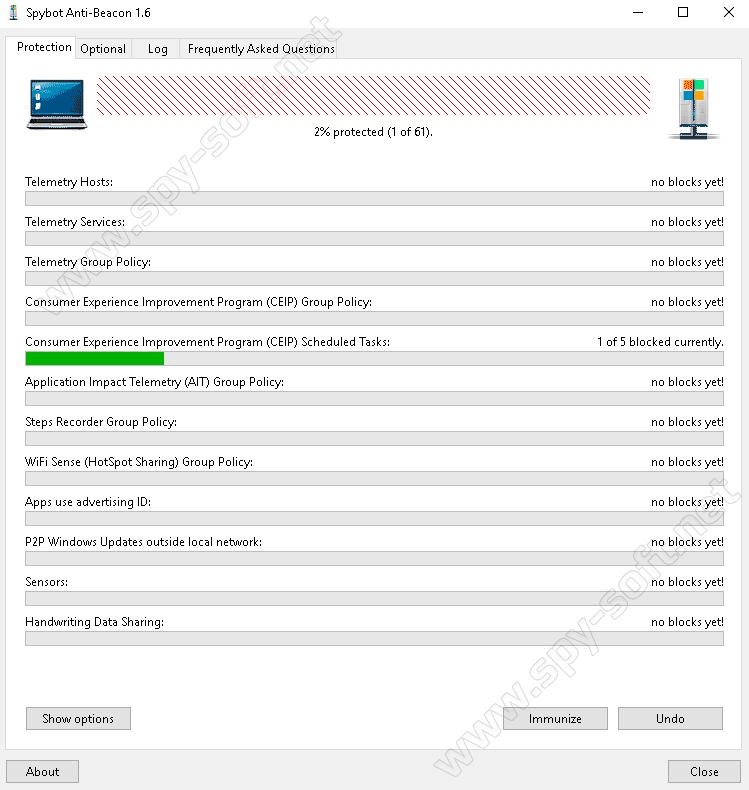
All of these Windows privacy settings can be configured with one click. Just click "Immunize" and the utility will disable them.
In case you want to disable only some of the privacy settings, there is a button "Show options" - "Show options", which contains more detailed information about what each item means, and which allows you to selectively fix the problems found.

Also go to the "Optional" tab. I personally blocked most of the items listed there, leaving only the Bing IP because I use that. But, if you don't use Bing, block it too.
The "Apply" button turns off tracking, and the "Undo" button returns the previous values. This is in case something goes wrong. Just in case, you can make a backup of the entire system.

Another thing that pleasantly surprised me is that Spybot Anti-Beacon provides privacy settings in Microsoft Office 2013 and 2016. For those who are not in the know, Microsoft Office also collects and sends user data to Microsoft.
At the moment, it is not known exactly what information is sent to Microsoft using Office, but it does not really matter. If it is possible to painlessly disable telemetry, it is always best to do this.

In fact, an advanced user with a sufficient level of work with a PC can do all this manually, but it will take a lot of time. And with this program, disabling telemetry and other Windows 10 spyware can be done faster and easier.
In my opinion, it's not even a bad program. It does not hang in the tray and does not eat memory, you launch it once and it itself fixes all the problems it finds. Then we close the program and sleep well. But keep in mind you will have to keep updating the program as Microsoft always changes where it hides telemetry options in Windows 10.
Yet due to the closed source code of Windows, it is completely impossible to be sure that any backdoors are not left for surveillance. The output is unix or linux.


