

Brother
Professional
- Messages
- 2,590
- Reaction score
- 544
- Points
- 113
The story of how we found, researched (with the help of the community on Reddit) and eventually discovered who connected the malicious device to our network.
Author: Christian Haschek
The story of how we found, researched (with the help of the community on Reddit) and eventually discovered who connected the malicious device to our network.
Last week I received a message and a photo from a colleague of mine.
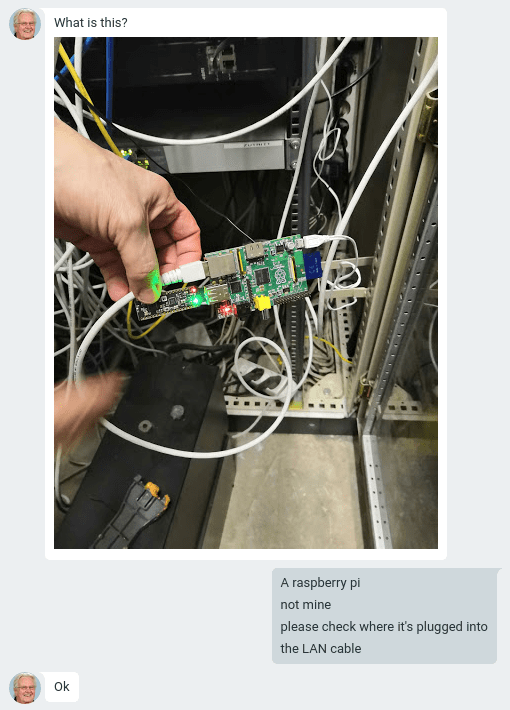
Figure 1: A message asking you to check where an unknown RaspberryPi device is connected
Since I mostly work remotely, I asked a colleague to disconnect and put the found device in a safe place, as well as take photos of all components and an image of the SD card. I have a lot of experience working with different projects where RaspberryPi was used, and I was sure that I could figure out what was going on.
At that time, no one suspected that the device was being used for malicious purposes. Everyone thought that one of the employees was conducting an experiment.
Device components
The found device consisted of three blocks:
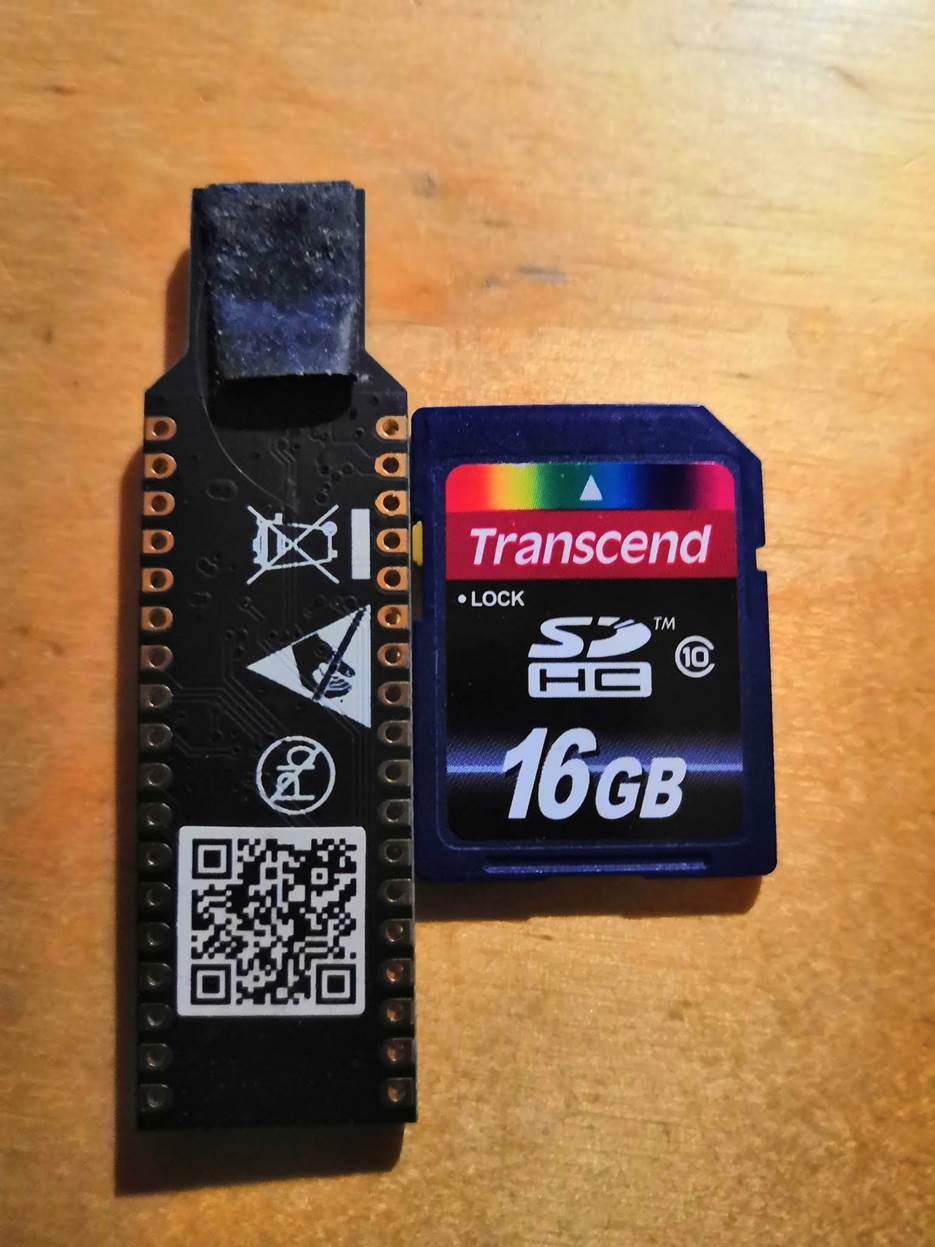
Figure 2: USB key and SD card
The first thing to do was ask who has access to this network node.
It turned out that only 4 people had the key to this small cabinet:
USB key model
For help in solving this riddle, I turned to Reddit, and the key was identified as a microprocessor that is practically not inferior in functionality to RasberryPi: nRF52832-MDK. Very powerful reader with Wi-Fi, Bluetooth and RFID support.
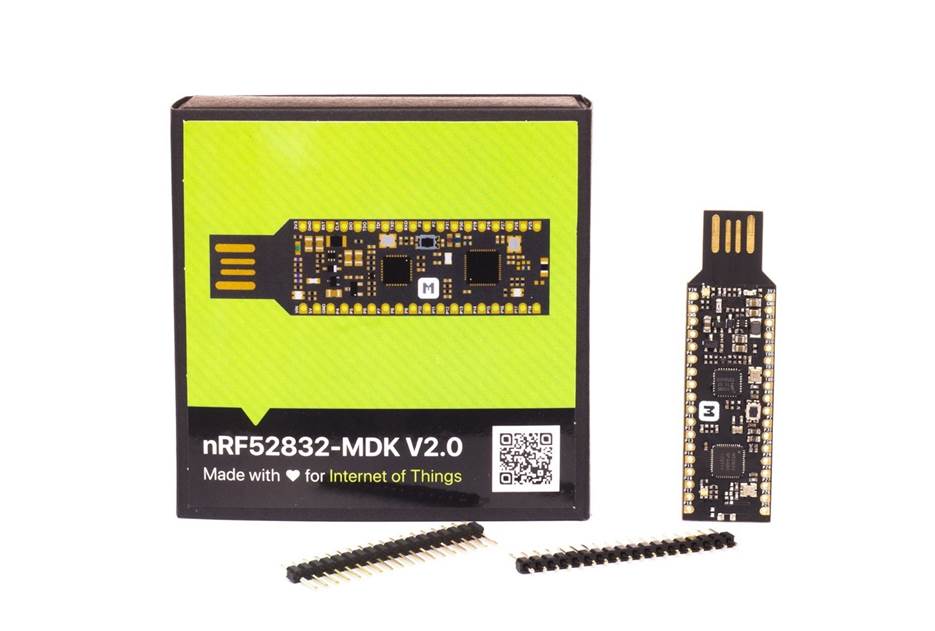
Figure 3: USB key (nRF52832-MDK model)
Without a doubt, this USB dongle was intended so that the old version of the Raspberry Pi could work over Wi-fi and Bluetooth.
Examining the SD card image
There are several sections on the SD card. Most with ext4 filesystem (linux), and one bootable with fat16.
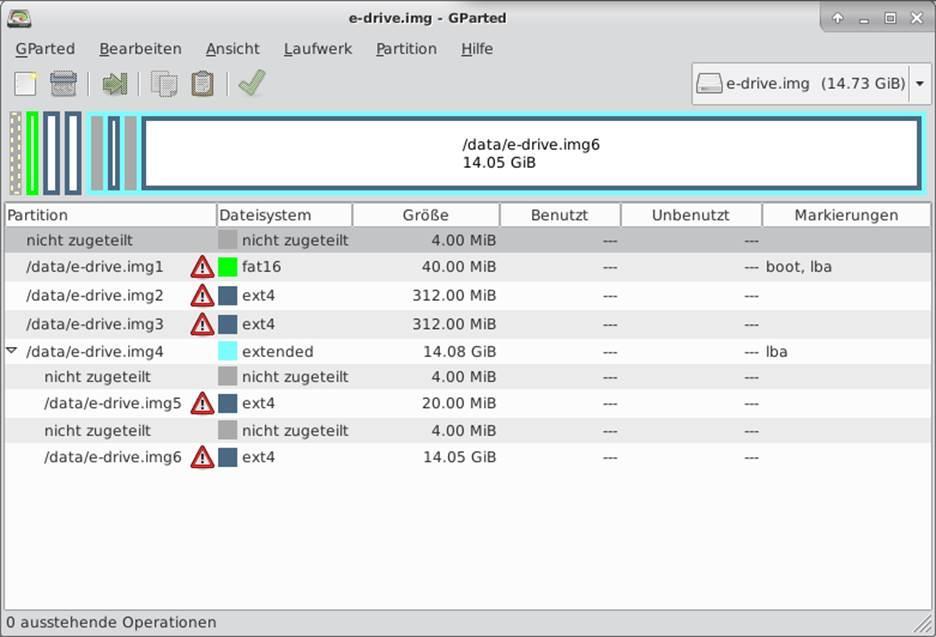
Figure 4: Partition structure of the image
We connect the image.
On my Debian-based system, I got the first important information: the image on the SD card was created and installed using Resin.
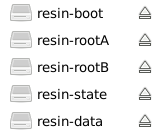
Figure 5: Sections of an SD card image created in Resin
What is Resin?
Resin (now renamed Balena) is a paid web service that allows you to create images for IoT devices, configure these devices, receive updates, and exchange data with Resin.
Resin also installs a VPN on the device so that the collected data can be transmitted securely. Obviously, the creator was planning to pick up his device, since the device kept traces in the form of an account to connect to a paid service.
Detailed exploration of sections
The first section is called "resin-boot".
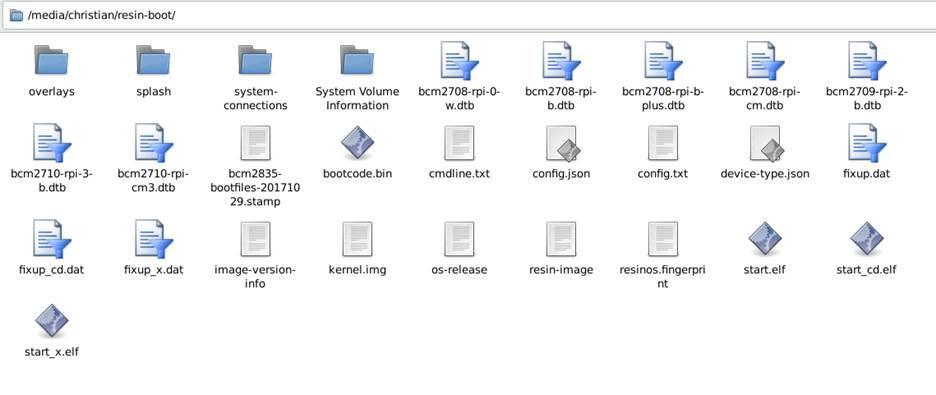
Figure 6: Contents of the resin-boot section
The config.json file immediately catches your eye. Have we hit the fast jackpot?
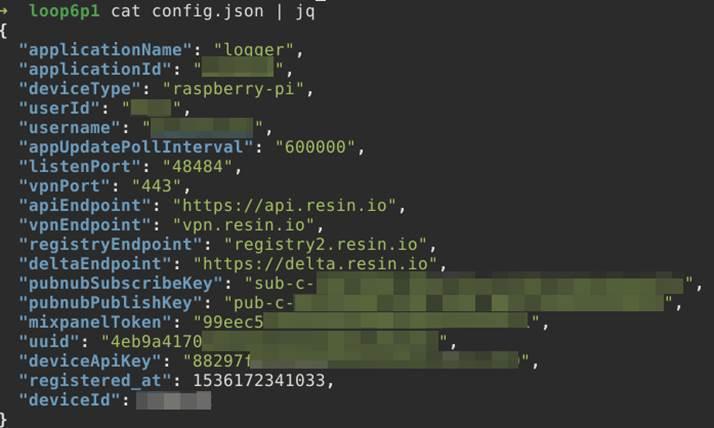
Figure 7: Contents of the config.json file located in the resin-boot section
What we can understand by examining this file:
When I googled the username found in the config.json file, I found a person in the same city where the device was found. The company checked their files on this person, but nothing was found.
It was very strange that I found a site from 2001 where parents of "gifted children" wrote articles about themselves and, for some reason, signed them in the form of their home address and phone number. Now I had the name and address of the whole family.

Figure 8: Similar site to the one I found
In fact, I could be on the wrong track since similar usernames can be used by different people. For now, let's just remember the found name.
Resin-data section
There was nothing interesting in the data directory (such as the collected information). I only managed to find a Node.js-based application that was heavily obfuscated, and at the moment I cannot say why this application was needed.
There seemed to be contact with the dongle over a serial connection, but I was unable to figure out what data was being collected. I can only assume that motion profiles were collected for Bluetooth and Wi-fi devices in the nearby area and, possibly, raw Wi-Fi packages.
But I found something much more interesting: the LICENSE.md file.

Figure 9: Contents of the LICENSE.md file
Strange ... Why this app contains such confidential information. I googled a company from the copyright section, and what do you think?
The person using the username found in the config file is the co-owner of this company.
It remains a mystery to me why the co-owner of the company should distribute such devices in the city.
Finding the attacker's home address
In the third section (resin-state), I found another interesting file in the / root-overlay / etc / NetworkManager / system-connections / directory named resin-wifi-01. And what do you think was in this file?
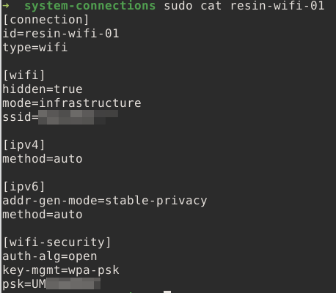
Figure 10: Contents of the resin-wifi-01 file
This file turned out to be an account for the Wi-Fi network, which was used to configure (or test) the device. But this Wi-Fi was not owned by the company. What do we do to find a location by network name? Go to wigle.net, enter the SSID (equivalent to the network name) and find a point on the map.
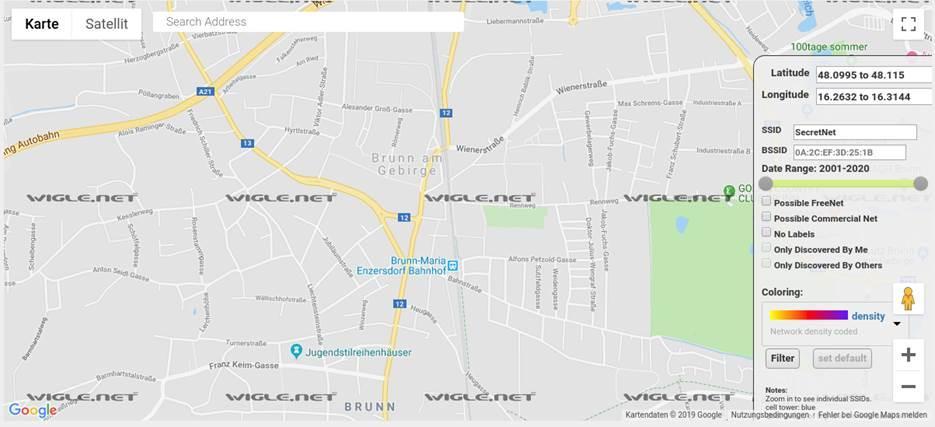
Figure 11: The name and address were out of date
Do you think the address found coincided with the address of the parents of gifted children? The wigle.net service returned the address where the suspicious device was found.
Afterword
I checked the DNS server logs and found the exact date when the found device first appeared on the network. I checked the RADIUS server logs to see which employees were in the room at the time, but only found a lot of error messages that there were attempts to connect over Wi-Fi using a deactivated account.
The deactivated account belonged to a former employee who (for some reason) agreed with management that he would keep the key to the premises for a while until he removed all his belongings from the building (don't ask why).
What now?
Now lawyers are engaged in this matter. I have done my job, and the rest is beyond my competence.
This was a very interesting case, and I would like to thank everyone involved in the discussion on Reddit who helped me solve this riddle.
Author: Christian Haschek
The story of how we found, researched (with the help of the community on Reddit) and eventually discovered who connected the malicious device to our network.
Last week I received a message and a photo from a colleague of mine.
Figure 1: A message asking you to check where an unknown RaspberryPi device is connected
Since I mostly work remotely, I asked a colleague to disconnect and put the found device in a safe place, as well as take photos of all components and an image of the SD card. I have a lot of experience working with different projects where RaspberryPi was used, and I was sure that I could figure out what was going on.
At that time, no one suspected that the device was being used for malicious purposes. Everyone thought that one of the employees was conducting an experiment.
Device components
The found device consisted of three blocks:
- First generation Raspberry Pi model b.
- Mysterious USB key.
- 16 GB SD card (with increased speed).
Figure 2: USB key and SD card
The first thing to do was ask who has access to this network node.
It turned out that only 4 people had the key to this small cabinet:
- The manager.
- At the guard.
- At my colleague's.
- I have.
USB key model
For help in solving this riddle, I turned to Reddit, and the key was identified as a microprocessor that is practically not inferior in functionality to RasberryPi: nRF52832-MDK. Very powerful reader with Wi-Fi, Bluetooth and RFID support.
Figure 3: USB key (nRF52832-MDK model)
Without a doubt, this USB dongle was intended so that the old version of the Raspberry Pi could work over Wi-fi and Bluetooth.
Examining the SD card image
There are several sections on the SD card. Most with ext4 filesystem (linux), and one bootable with fat16.
Figure 4: Partition structure of the image
We connect the image.
On my Debian-based system, I got the first important information: the image on the SD card was created and installed using Resin.
Figure 5: Sections of an SD card image created in Resin
What is Resin?
Resin (now renamed Balena) is a paid web service that allows you to create images for IoT devices, configure these devices, receive updates, and exchange data with Resin.
Resin also installs a VPN on the device so that the collected data can be transmitted securely. Obviously, the creator was planning to pick up his device, since the device kept traces in the form of an account to connect to a paid service.
Detailed exploration of sections
The first section is called "resin-boot".
Figure 6: Contents of the resin-boot section
The config.json file immediately catches your eye. Have we hit the fast jackpot?
Figure 7: Contents of the config.json file located in the resin-boot section
What we can understand by examining this file:
- The device uses the "logger" application. Not a good sign.
- Username, which is most likely the name of the Resin service account associated with this device.
- The device uses VPN on port 443.
- Registration date. Registration (or first setup) was on May 13, 2018.
When I googled the username found in the config.json file, I found a person in the same city where the device was found. The company checked their files on this person, but nothing was found.
It was very strange that I found a site from 2001 where parents of "gifted children" wrote articles about themselves and, for some reason, signed them in the form of their home address and phone number. Now I had the name and address of the whole family.
Figure 8: Similar site to the one I found
In fact, I could be on the wrong track since similar usernames can be used by different people. For now, let's just remember the found name.
Resin-data section
There was nothing interesting in the data directory (such as the collected information). I only managed to find a Node.js-based application that was heavily obfuscated, and at the moment I cannot say why this application was needed.
There seemed to be contact with the dongle over a serial connection, but I was unable to figure out what data was being collected. I can only assume that motion profiles were collected for Bluetooth and Wi-fi devices in the nearby area and, possibly, raw Wi-Fi packages.
But I found something much more interesting: the LICENSE.md file.
Figure 9: Contents of the LICENSE.md file
Strange ... Why this app contains such confidential information. I googled a company from the copyright section, and what do you think?
The person using the username found in the config file is the co-owner of this company.
It remains a mystery to me why the co-owner of the company should distribute such devices in the city.
Finding the attacker's home address
In the third section (resin-state), I found another interesting file in the / root-overlay / etc / NetworkManager / system-connections / directory named resin-wifi-01. And what do you think was in this file?
Figure 10: Contents of the resin-wifi-01 file
This file turned out to be an account for the Wi-Fi network, which was used to configure (or test) the device. But this Wi-Fi was not owned by the company. What do we do to find a location by network name? Go to wigle.net, enter the SSID (equivalent to the network name) and find a point on the map.
Figure 11: The name and address were out of date
Do you think the address found coincided with the address of the parents of gifted children? The wigle.net service returned the address where the suspicious device was found.
Afterword
I checked the DNS server logs and found the exact date when the found device first appeared on the network. I checked the RADIUS server logs to see which employees were in the room at the time, but only found a lot of error messages that there were attempts to connect over Wi-Fi using a deactivated account.
The deactivated account belonged to a former employee who (for some reason) agreed with management that he would keep the key to the premises for a while until he removed all his belongings from the building (don't ask why).
What now?
Now lawyers are engaged in this matter. I have done my job, and the rest is beyond my competence.
This was a very interesting case, and I would like to thank everyone involved in the discussion on Reddit who helped me solve this riddle.

